

We love that there are so many apps out there trying to help us focus. But which ones actually work, and which ones seem great but don’t actually do much once the novelty wears off? We tested them so you don’t have to — and here are our honest thoughts.
Focus Friend

Best for | Cute Body Doubling Focus
Available On | App Store, Google Play Store
Price | Free, or $1.25-$2/month for more features
Soon after Focus Friend launched last August, it was the No. 1 listing on the App Store. And we can totally see why.
Focus Friend hijacks the brain to keep users undistracted in two different ways: 1) body doubling, and 2) exploiting dopamine-based reward systems that gamers thrive on.
The cutesily designed tool works like this: Set a timer in Focus Friend, during which you will be locked out of all other apps excluding texts, emails, and calls. Throughout that stretch, an adorable little bean darns socks that can be exchanged for furniture for the bean’s home. If you interrupt the bean (I’ve named mine “Bean Bean”) whilst knitting, you can re-access all other apps — but Bean Bean’s animated disappointment is an effective deterrent to interrupting him/her/them/it (do beans have genders?) unless necessary.
Focus Friend was conceived by the internet’s favorite educator Hank Green and developed by Bria Sullivan, a former Google and Microsoft programmer who went independent and now leads Los Angeles-based Honey B Games.
Focus Friend is free, with some added features available for a monthly subscription of $1.25-$2.
The superbly adorable design is what encourages me to repeatedly lock my phone throughout the day to give the little guy time to knit. Likewise, I can compare the feng shui of Bean Bean’s abode with those of two of my family members’ Focus Friends: “Beanie Eilish” and “Madame Bean.” – Adam Rogan
Pros:
- The cute little bean character motivates you to stay off your phone so it can finish its knitting.
- There is a fun option to be interactive, hosting other players’ beans at your home.
- There is a free version available.
Cons:
- If the bean gets sad, it could trigger rejection sensitivity/guilt or make you feel sad too.
BRICK

Best For | Physical Phone Blocker
Available On | App Store, Google Play Store
Price | $59 for Brick; free app
When I first heard about the BRICK — a physical brick that you tap your phone to lock specified, designated apps — I was intrigued, but not entirely sold. Then I saw my 6-hour-plus daily phone screen time. I had a bit of a come-to-Jesus moment, and decided to give it a try.
BRICK is a simple gray box magnet, so I put mine on the fridge. I was super excited about the novelty of it all when I first got it. Every time I needed to focus on my work, I’d walk into my kitchen, brick my phone, then get to work. It was a nice routine, and I loved the physicality of it. Then the novelty wore off after about a week, and I completely forgot it existed — out of sight, out of mind, right?
Now, I sometimes think I should use it again, but honestly, the thought of getting up from my desk and walking over to the kitchen to lock my phone paralyzes me from using it. Maybe I should try putting it closer to my desk?
All in all, it didn’t work great for me, but perhaps it would work well for someone who doesn’t mind the lack of bells and whistles. – Brianna Schubert
Pros:
- It physically locks your phone apps, so you can’t override it easily like with other app-blockers.
- The tapping feature works really well.
- You can select exactly which apps you want to block.
Cons:
- It’s definitely more costly compared to other app blockers.
- Not very dopamine-inducing, so I got bored of it quickly.
- If you place it out of sight (which is ideally helpful for truly blocking apps), you might forget about it altogether.
Opal
Best For | Combined App Blocker and Focus App
Available On | App Store, Google Play Store, Mac Download
Cost | Free, or $8+/month for more features
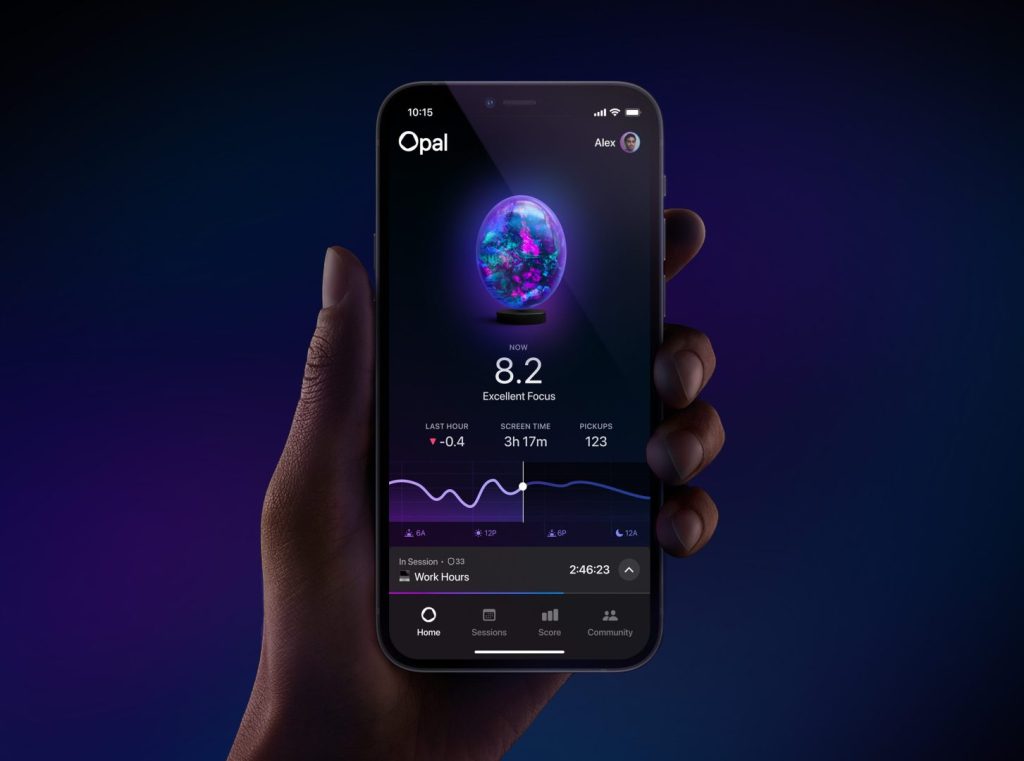
If you, like me, struggle with impulse control and often find yourself sinking into the quicksand of dopamine-fueled scrolling, Opal might be your rope out.
I’ve used this screen-time app for over a year, and it’s the only one that’s consistently helped me reduce social media use. You can block specific apps, schedule recurring sessions, and even take short 5- to 15-minute breaks during focus periods. The genius lies in the gentle friction it creates.You can choose a focus difficulty, ranging from “Normal,” where you can easily snooze and cancel your focus sessions, to “Deep Focus,” where you can’t cancel or exit it at all until it’s complete. – Megan Looney
Pros:
- It’s customizable because you can give your blocks fun names.
- The in-app metrics feel encouraging.
- The free version is surprisingly effective.
Cons:
- There is a subscription for premium features.
- At times, the interface can feel scattered.
Focus Traveller

Best For | Cute Focus Timer
Available On | App Store
Cost | Free, or $0.99/month for more features.
If you’re looking for a gentle and calming focus timer where you can focus by yourself or with friends, this is a great option. I downloaded this because I saw it on Instagram and thought the graphics were so cute and calming. Essentially, you choose an amount of time, and a little hiker walks up a mountain while you work. If you need to pause it, you can tap the screen, and they’ll go sit by the fire until you’re back.
What I love about this app is that it’s really soothing, with music, slow visuals, and a gentle overall feeling. Also, because the little hiker is walking up a mountain, it feels like they’re body doubling you while you work. – Brianna Schubert
Pros:
- Calming visuals and music make the app a soothing experience.
- You have the ability to connect with friends and create a “travel group” where you focus together.
- The free version includes most of the features.
Cons:
- Not a lot of reinforcement to come back to the app (i.e., no notifications), so you have to remember to go to it.
Forest
Best For | Focus Timer That Gives Back
Available On | App Store, Google Play Store
Cost | Free; option to pay to plant real trees
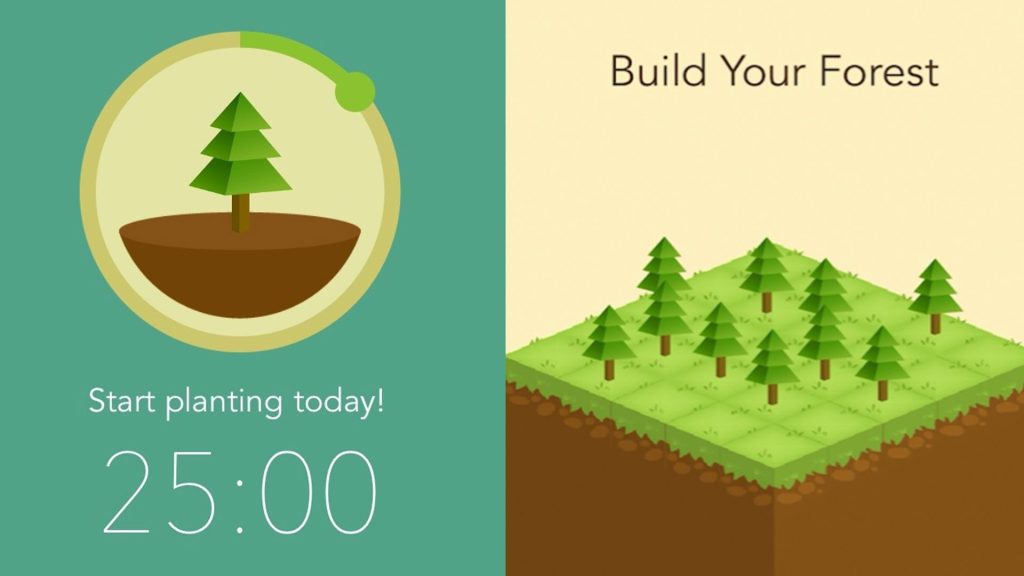
In this app, as you focus, you grow a tree to plant in your virtual forest. But the app also offers a way to plant real trees from your focus. The more you focus, the more coins you accrue — and you can turn those into planting a real tree in partnership with different organizations, like Trees for the Future. You can also use the coins you earn from focusing to buy different (virtual) plants to add to your forest.
I mostly use this app for its timer, but I think it’s really cool that there’s an option to give back as well. If planting a real tree (and/or putting money on the line) is a good incentive to get you to actually focus, this might be a good option for you. – Brianna Schubert
Pros:
- There’s an option to plant real trees as a reward
- It’s fun to decorate your virtual forest with the cute graphics of plants and trees.
- The free version offers most of the features.
Cons:
- It is a bit confusing how to actually plant a real tree at first.








Your email address will not be published. Required fields are marked with *